Compute Savings Plans
Flexible compute-wide discounts (C5.4xlarge example)
Monthly cost (est.)
$—

Ever wondered why companies like Netflix, Airbnb, or Uber don’t build and maintain massive data centers of their own? Instead, they rely on Amazon Web Services (AWS). The answer lies in Cloud Economics — the art of balancing cost, value, and performance in the cloud.
At its core, Cloud Economics is about getting the best value from the cloud while keeping costs under control. With AWS, you don’t just rent technology — you gain the ability to scale up or down, pay only for what you use, and make smarter financial decisions.
Think of it as finding the sweet spot between:
Cost: How much do you spend
Value: The business benefit you gain

Cost Efficiency – Avoid wasting money on idle servers or unused capacity.
Elasticity – Instantly scale resources up or down depending on demand.
Agility & Innovation – Faster experiments without huge upfront investments.
Imagine two scenarios:
Owning a Car: You pay upfront, handle maintenance, insurance, and repairs — even if you drive it only occasionally.
Renting a Car: You pay only when you need it, choose the right model for the trip, and return it when done.
AWS works like renting a car — it frees businesses from heavy upfront costs and lets them pay only for the services they use.
AWS Cloud Economics is about maximizing business value while controlling costs. It’s not just about saving money — it’s about enabling innovation, speed, and growth without heavy financial risk.
Think about your electricity bill at home. You don’t pay a fixed price every month regardless of usage — you pay only for the number of units consumed. AWS pricing works the same way through the Pay-As-You-Go model.
In AWS, Pay-As-You-Go means:
No upfront costs: You don’t need to buy servers or commit to large expenses.
Usage-based billing: You only pay for the resources you actually use.
No long-term contracts: Start and stop services anytime.
This gives businesses financial flexibility — especially helpful for startups, students, or anyone testing new ideas.

Turn on a service → start paying.
Turn it off → stop paying.
For example:
Run an EC2 instance for 2 hours → pay only for those 2 hours.
Store 10 GB in S3 → pay only for 10 GB, not for unused capacity
Pay-As-You-Go = Hotel stay flexibility. Businesses save money and gain freedom to adjust resources as needs change.
Want to try before you buy?" That’s exactly what the AWS Free Tier is all about. It lets learners, startups, and businesses explore AWS services at little to no cost before committing.
AWS Free Tier offers three types of free usage benefits:
Always Free – Services that remain free indefinitely, within usage limits (e.g., AWS Lambda 1M requests/month).
12-Month Free – Services free for the first 12 months after creating an AWS account (e.g., 750 hours/month of EC2 t2.micro).
Trials – Short-term free offers for specific services (e.g., Amazon Inspector free for 90 days).
When you sign up for AWS, Free Tier benefits apply automatically.
Each service has limits (e.g., GBs, hours, requests). If you exceed them, you pay standard rates.
It’s a safe way to explore cloud computing without financial risk.

Imagine walking through a supermarket:
Some stalls give free samples every day (Always Free).
Some stalls let you try for a year if you’re a new shopper (12-Month Free).
Some stalls offer limited-time tasting (Trials).
AWS Free Tier works just like this — giving you a taste of cloud services before you buy.
Need a server right now? Just turn it on!" That’s the power of On-Demand Pricing in AWS — giving you computing resources whenever you need them, without long-term commitments.
You pay for compute or database capacity by the hour or second (depending on the service).
No upfront payment or contract is required.
Perfect for workloads that are unpredictable or short-lived.
It’s like ordering food delivery: you pay for it when you need it, but you don’t keep paying once the meal is done.
Launch an EC2 instance for 3 hours → pay for exactly 3 hours.
Use the RDS database for 1 day → pay only for that day.
Shut it down → billing stops immediately.
This makes it easy to experiment or handle sudden spikes in demand.

Owning a Car: Big upfront payment, fixed costs, ongoing maintenance — whether you drive or not.
Taxi Ride: Pay only for the distance and time you actually travel, then stop paying once you’re done.
On-Demand Pricing = Taxi model — flexible, convenient, no strings attached.
Unpredictable workloads: You don’t know how much capacity you’ll need.
Short-term projects: Great for testing and development.
Spiky demand: Handle sudden traffic bursts without long-term costs.
Planning to stay long-term? Book in advance!" That’s the idea behind Reserved Instances (RIs) — commit for a longer period and enjoy big cost savings.
Reserved Instances are a pricing model where you commit to using AWS services (like EC2 or RDS) for 1 year or 3 years. In return, you get up to 75% savings compared to On-Demand pricing.
Key Points:
Long-term commitment = lower hourly rate.
Choose upfront payment options: All upfront, partial upfront, or no upfront.
Best suited for steady workloads that run continuously.
You “reserve” a server type in advance.
Whether you use it 100% or only partially, you’re committed to paying for the reserved capacity.
Ideal for businesses that know they will need consistent compute resources.
Daily Pass to the Gym : Pay higher rates every time you walk in.
Yearly Membership: Pay upfront or monthly, but at a much cheaper per-day cost.
Reserved Instances = Yearly Gym Membership → best for regular users who know they’ll keep coming back.
For workloads that are steady and predictable (e.g., a company website running 24/7).
When you want to maximize savings by committing for the long term.
When you can forecast your resource usage.
The AWS Pricing Calculator is a free online tool that helps you:
Estimate costs of AWS services before using them.
Compare pricing models (On-Demand, Reserved, Savings Plans).
Plan budgets for projects or migrations.
Avoid surprises in your monthly AWS bill.
Go to the AWS Pricing Calculator website.
Add services you plan to use (e.g., EC2, S3, RDS).
Configure details (instance size, storage, usage hours, data transfer).
The calculator gives you an estimated monthly cost.
It’s like building a shopping cart before checkout — but instead of groceries, you’re adding cloud resources.

When you shop online, you add items to your cart and see the total price before checkout.
You can add/remove items and instantly know how it changes the cost.
AWS Pricing Calculator works the same way — helping you plan your spending before committing
Before launching resources: Estimate and decide which pricing option is best.
For project planning: Forecast monthly budgets.
For cost comparisons: On-Demand vs. Reserved vs. Spot.
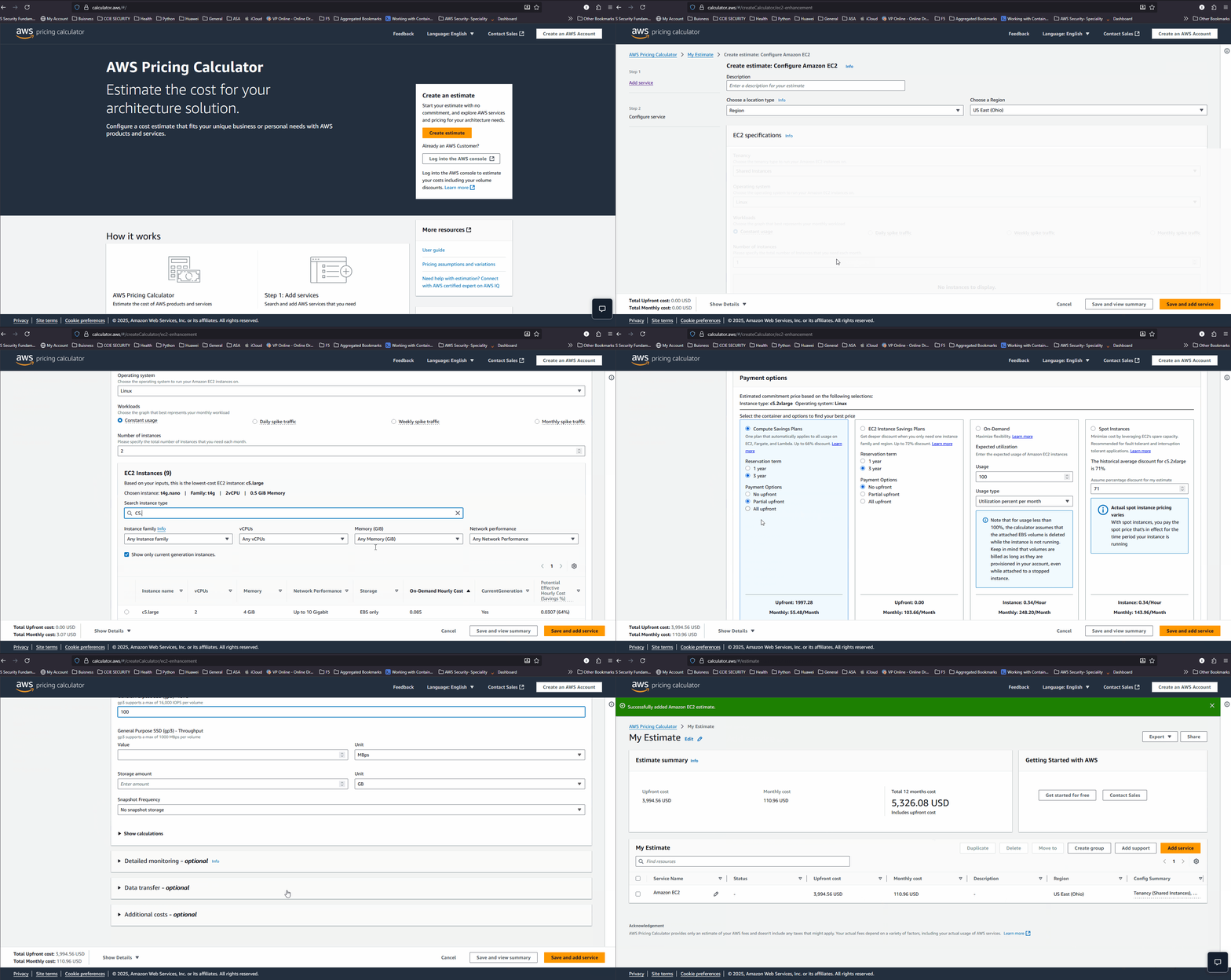
You want to run 2 EC2 c5.2xlarge instances 24/7 for one month with 100 GB of EBS volume. Use the reservation model of 3 years with partial upfront payment.”
Open the AWS Pricing Calculator in your browser.
Click Create Estimate.
Add Amazon EC2:
Select c5.2xlarge instance type.
Set Quantity = 2.
Set Usage = 750 hours/month (24/7 usage for one month).
Under Pricing Model, select Reserved Instances.
Choose a 3-Year Term and Partial Upfront Payment.
Add Amazon EBS:
Select General Purpose SSD (gp3) or default storage type.
Set Size = 100 GB.
Review the Cost Breakdown:
EC2 charges based on the reserved instance hourly rate.
EBS charges per GB provisioned.
See the total monthly estimate at the bottom.
Extended Exploration:
Switch from 3-Year Reserved to On-Demand → compare total costs.
Try 1-Year Reserved instead of 3-Year → note the savings difference.
Increase EBS volume to 500 GB → see how storage scales cost.
Explore payment options (All Upfront vs. Partial Upfront vs. No Upfront).
Why does the 3-Year Reserved Instance save more compared to On-Demand?
How does upfront payment (partial vs. full) change your budgeting strategy?
For which kinds of workloads would committing to a 3-year reservation make sense?
The AWS Pricing Calculator is your cloud budget planner. Just like an online shopping cart, it shows you the cost upfront, so you can make smart financial decisions before you deploy.
Want huge discounts? But with a catch!" That’s the story of Spot Instances — offering up to 90% off compared to On-Demand prices, but with some trade-offs.
Spot Instances let you use spare AWS compute capacity at massive discounts. However:
AWS can reclaim these instances at any time if demand rises.
You get a 2-minute warning before interruption.
Best suited for workloads that are flexible and fault-tolerant.
AWS has unused compute power sitting idle.
Instead of wasting it, AWS offers it to you at a very low cost.
If AWS needs that capacity back, your Spot Instance is stopped or terminated.

Regular Ticket : Higher price, guaranteed seat.
Last-Minute Deal: Much cheaper, but flights may be rescheduled or unavailable.
Spot Instances = Last-minute deal — you save big but must accept uncertainty.
For batch processing jobs.
For big data analysis or rendering workloads.
For stateless, fault-tolerant applications.
Not recommended for mission-critical apps that require 100% uptime.
Spot Instances are a great way to save money — up to 90% off — but you must design your workloads to handle possible interruptions.
Want savings with flexibility?" That’s the promise of AWS Pricing Plans — helping you balance long-term discounts with the freedom to adapt.
AWS offers different ways to save money beyond On-Demand pricing:
Reserved Instances (RIs) – Commit to a specific instance type in a region for 1 or 3 years.
Savings Plans – Commit to a certain amount of usage ($/hour) for 1 or 3 years, but with greater flexibility in how you use services.
Both options can give you up to 72% savings compared to On-Demand.
Reserved Instances (RIs):
Fixed to a specific instance type, OS, and region.
Choose payment option: All Upfront, Partial Upfront, or No Upfront.
Savings Plans:
Commit to spend a consistent amount (e.g., $10/hour) on compute.
Can be applied across EC2, Fargate, and Lambda.
Offers flexibility to switch between instance types or regions.

Reserved Instances = Buffet Pass: Pay upfront for specific meals at one restaurant. Great savings, but limited choices.
Savings Plans = Meal Subscription: Pay a fixed amount each month, but enjoy different meals at various restaurants. More flexibility.
Reserved Instances: Best for predictable, steady workloads where you know exactly what you need.
Savings Plans: Best if you want savings but also flexibility to change instance types or services over time.
AWS Pricing Plans let you trade commitment for savings. Reserved Instances give maximum discounts if you know your needs, while Savings Plans give flexibility across services with significant savings.
The more you buy, the less you pay per unit." That’s how AWS Volume Discounts work — rewarding higher usage with lower per-unit costs.
AWS automatically reduces your per-unit price when your usage crosses certain thresholds. You don’t need to negotiate or sign up — discounts apply automatically as usage grows.
Examples:
Amazon S3: The first 50 TB/month has one rate, but the cost per GB decreases for the next 450 TB.
Data Transfer: Larger outbound transfer volumes are charged at lower rates per GB.
EC2 & RDS Reserved Usage: Some services also offer tiered pricing benefits.
Start small: You pay the base rate.
As usage grows, you automatically shift into lower pricing tiers.
Your overall bill grows, but the cost per unit decreases.

When storing large amounts of data in S3.
When transferring high volumes of data.
For organizations scaling workloads that grow steadily over time.
AWS Volume Discounts reward scale. The more resources you consume, the less you pay per unit — just like bulk shopping.