
Multi-cloud refers to the practice of using services from more than one cloud provider — such as AWS, Google Cloud, or Microsoft Azure — within a single organization. Many enterprises adopt multi-cloud strategies to avoid vendor lock-in, optimize costs, enhance resilience, and leverage the strengths of different providers. For example, a business might run its machine learning workloads on Google Cloud while using AWS for scalable storage and compute.
Identity and Access Management (IAM) is the framework that controls who (identity) can access what (resources) under which conditions.
In cloud environments, IAM ensures that only authorized users, applications, and services can perform specific actions, such as launching virtual machines, accessing S3 buckets, or modifying databases.
IAM is the backbone of cloud security, enabling organizations to enforce the principle of least privilege and manage permissions effectively across users, groups, roles, and policies.
IAM is critical because it directly impacts both security and operational efficiency in the cloud:
Security: Prevents unauthorized access and protects sensitive data.
Compliance: Helps organizations meet regulatory frameworks like PCI-DSS, HIPAA, and ISO 27001.
Operational Efficiency: Centralizes identity management, reducing administrative overhead and errors.
Auditability: Provides logs and accountability by tracking “who did what” in the environment.
Without a well-implemented IAM strategy, cloud environments quickly become vulnerable, complex, and non-compliant.
Core IAM Concepts in AWS vs GCP
Identities and Principals
At the heart of IAM are identities — the entities that request access to resources.
AWS:
IAM Users – long-term identities for individuals or apps needing credentials.
IAM Groups – collections of users for easier permission management.
IAM Roles – temporary identities assumed by trusted entities (users, services, or accounts).
Example: A developer (DevUser1) belongs to the Developers group and may temporarily assume a role to deploy resources in another AWS account.
Google Cloud (GCP):
Example: A Compute Engine VM uses a service account to authenticate and call Cloud Storage without embedding credentials.
- Google Accounts – human identities tied to Gmail/Workspace.
- Service Accounts – non-human identities for apps, workloads, or VMs.
- Groups – managed via Google Groups for batch access control.
Key Difference: AWS separates users and roles clearly, while GCP emphasizes service accounts as the default identity for workloads.
Roles and Permissions
Roles define what actions identities can perform.
aOur company specializes in consulting, product development, and customer support. We tailor our services to fit the unique needs of businesses across various sectors, helping them grow and succeed in a competitive market
Policies
Policies are the rules that enforce permissions.
AWS IAM Policies:
JSON documents with Effect (Allow/Deny), Action, Resource, and Condition.
Very flexible with conditional keys (aws:SourceIp, aws:MultiFactorAuthPresent).
Policies can be attached to users, groups, or roles.
Text
Example:
{
  "Effect": "Allow",
  "Action": "ec2:StartInstances",
  "Resource": "arn:aws:ec2:region:account-id:instance/i-123456"
}
GCP IAM Policies:
Structured as bindings: { Principal → Role → Resource }.
Roles contain sets of permissions, and identities are bound to those roles.
Conditions are supported for context-aware access (IP, time, etc.).
Example: Binding a service account to a storage role:
bindings:
- members:
  - serviceAccount:analytics-sa@my-project.iam.gserviceaccount.com
  role: roles/storage.objectViewer
Key Difference: AWS policies are highly flexible but verbose. GCP’s binding model is simpler, but less customizable than AWS’s granular JSON policies.
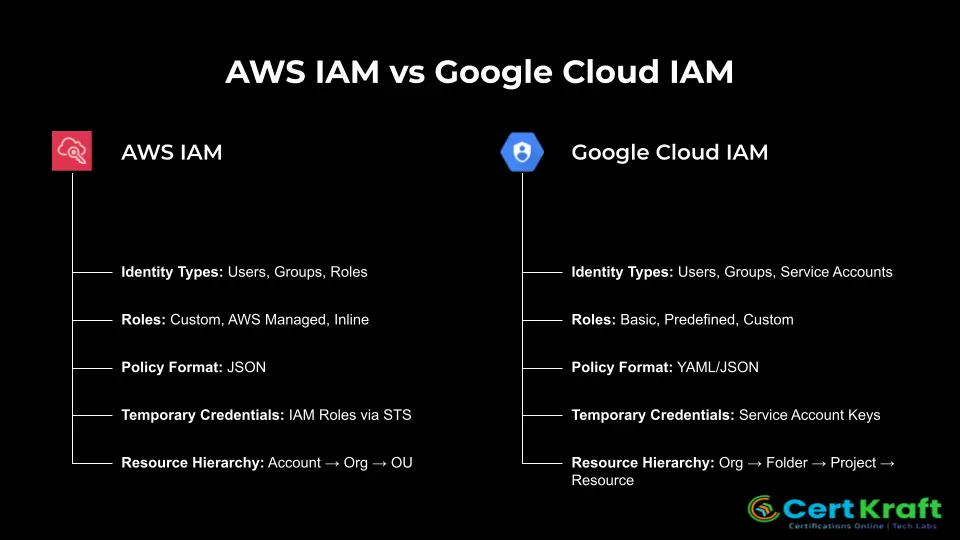
Usability & Management Differences
AWS IAM
Fine-grained Control: AWS IAM uses JSON policies that allow very precise permissions. You can control actions down to the API call and apply conditions like IP address, time, or MFA requirement.
Complexity at Scale: While powerful, JSON policies can be difficult to manage across hundreds of users, roles, and accounts. Slight mistakes in JSON structure may lead to overly broad or broken access.
Organizational Controls: AWS supports Permission Boundaries (per-entity maximums) and Service Control Policies (SCPs) at the AWS Organization level. These provide layered governance across accounts.
Tooling: IAM Access Analyzer, IAM Policy Simulator, and AWS Config rules help test and audit policies, but require expertise to interpret.
Strength: Extremely granular permissions.
Weakness: Steep learning curve and complex management in large enterprises.
Google Cloud IAM
Hierarchical Structure: Google Cloud IAM uses a resource hierarchy — Organization → Folder → Project → Resource. Permissions applied at higher levels are inherited by lower levels, simplifying administration.
Role Inheritance: Assigning a role at the org or folder level automatically applies it to projects and resources below. This makes onboarding new teams faster, but can unintentionally result in over-provisioning.
Role Types: Basic roles (Owner, Editor, Viewer) are simple but too broad for production. Predefined and custom roles offer more control, albeit with less granularity, compared to AWS JSON policies.
Ease of Use: Policies are structured as bindings (member → role → resource) in YAML/JSON, which are easier to read than AWS JSON policies but offer fewer advanced condition options.
Strength: Simpler inheritance and easier onboarding.
Weakness: Harder to track and audit effective permissions at scale (risk of “role sprawl”).